
%20--%3e%3c!DOCTYPE%20svg%20PUBLIC%20'-//W3C//DTD%20SVG%201.1//EN'%20'http://www.w3.org/Graphics/SVG/1.1/DTD/svg11.dtd'%20[%20%3c!ENTITY%20ns_extend%20'http://ns.adobe.com/Extensibility/1.0/'%3e%3c!ENTITY%20ns_ai%20'http://ns.adobe.com/AdobeIllustrator/10.0/'%3e%3c!ENTITY%20ns_graphs%20'http://ns.adobe.com/Graphs/1.0/'%3e%3c!ENTITY%20ns_vars%20'http://ns.adobe.com/Variables/1.0/'%3e%3c!ENTITY%20ns_imrep%20'http://ns.adobe.com/ImageReplacement/1.0/'%3e%3c!ENTITY%20ns_sfw%20'http://ns.adobe.com/SaveForWeb/1.0/'%3e%3c!ENTITY%20ns_custom%20'http://ns.adobe.com/GenericCustomNamespace/1.0/'%3e%3c!ENTITY%20ns_adobe_xpath%20'http://ns.adobe.com/XPath/1.0/'%3e%20]%3e%3csvg%20version='1.1'%20id='Layer_1'%20xmlns:x='&ns_extend;'%20xmlns:i='&ns_ai;'%20xmlns:graph='&ns_graphs;'%20xmlns='http://www.w3.org/2000/svg'%20xmlns:xlink='http://www.w3.org/1999/xlink'%20x='0px'%20y='0px'%20viewBox='0%200%2062.8%2054.8'%20style='enable-background:new%200%200%2062.8%2054.8;'%20xml:space='preserve'%3e%3cstyle%20type='text/css'%3e%20.st0{fill:%23185C37;}%20.st1{fill:%2333C481;}%20.st2{fill:%2321A366;}%20.st3{opacity:0.1;enable-background:new%20;}%20.st4{opacity:0.2;enable-background:new%20;}%20.st5{fill:url(%23SVGID_1_);}%20.st6{fill:%23FFFFFF;}%20%3c/style%3e%3cmetadata%3e%3csfw%20xmlns='&ns_sfw;'%3e%3cslices%3e%3c/slices%3e%3csliceSourceBounds%20bottomLeftOrigin='true'%20height='54.8'%20width='62.8'%20x='0.5'%20y='4.6'%3e%3c/sliceSourceBounds%3e%3c/sfw%3e%3c/metadata%3e%3cpath%20class='st0'%20d='M60.1,54.8H24.4c-1.5,0-2.7-1.2-2.7-2.7V36.5l13.7-6.8l17.1,6.8h7.6c1.5,0,2.7,1.2,2.7,2.7v12.9%20C62.8,53.6,61.6,54.8,60.1,54.8z'/%3e%3cpath%20class='st1'%20d='M42.2,18.3l-16,5.7L8,18.3V2.7C8,1.2,9.2,0,10.7,0h28.9c1.5,0,2.7,1.2,2.7,2.7L42.2,18.3L42.2,18.3z'/%3e%3cpath%20class='st2'%20d='M8,18.3h41.8c1.5,0,2.7,1.2,2.7,2.7v15.6H10.7c-1.5,0-2.7-1.2-2.7-2.7V18.3z'/%3e%3cpath%20class='st3'%20d='M21.7,46.8h8.7c1.3,0,2.4-0.9,2.6-2.2V14.1c0-1.5-1.2-2.7-2.6-2.7H8v22.4c0,1.5,1.2,2.7,2.7,2.7h11V46.8z'/%3e%3cpath%20class='st4'%20d='M30.4,45.7c2.1,0,3.8-1.7,3.8-3.8V14.1c0-2.1-1.7-3.8-3.8-3.8H8v23.6c0,1.5,1.2,2.7,2.7,2.7h11v9.1%20C21.7,45.7,30.4,45.7,30.4,45.7z'/%3e%3cpath%20class='st4'%20d='M30.4,44.5c1.5,0,2.7-1.2,2.7-2.6V14.1c0-1.5-1.2-2.7-2.6-2.7H8v22.4c0,1.5,1.2,2.7,2.7,2.7h11v8%20C21.7,44.5,30.4,44.5,30.4,44.5z'/%3e%3cpath%20class='st3'%20d='M29.3,44.5c1.5,0,2.7-1.2,2.7-2.6V14.1c0-1.5-1.2-2.7-2.6-2.7H8v22.4c0,1.5,1.2,2.7,2.7,2.7h11v8%20C21.7,44.5,29.3,44.5,29.3,44.5z'/%3e%3clinearGradient%20id='SVGID_1_'%20gradientUnits='userSpaceOnUse'%20x1='5.5643'%20y1='2105.324'%20x2='26.4033'%20y2='2141.4199'%20gradientTransform='matrix(1%200%200%201%200%20-2096)'%3e%3cstop%20offset='0'%20style='stop-color:%2318884F'/%3e%3cstop%20offset='0.5'%20style='stop-color:%23117E43'/%3e%3cstop%20offset='1'%20style='stop-color:%230B6631'/%3e%3c/linearGradient%3e%3cpath%20class='st5'%20d='M2.7,11.4h26.6c1.5,0,2.7,1.2,2.7,2.7v26.6c0,1.5-1.2,2.7-2.7,2.7H2.7c-1.5,0-2.7-1.2-2.7-2.7V14.1%20C0,12.6,1.2,11.4,2.7,11.4z'/%3e%3cpath%20class='st6'%20d='M16.5,18.5c1.7-0.1,3.4,0.4,4.7,1.4c1.1,1.1,1.7,2.6,1.6,4.1c0,1.1-0.3,2.1-0.8,3.1c-0.6,0.9-1.4,1.6-2.3,2.1%20c-1.1,0.5-2.3,0.8-3.5,0.7h-3.3v6.3H9.5V18.5H16.5z%20M13,27.2h2.9c0.9,0.1,1.8-0.2,2.6-0.8c0.6-0.6,0.9-1.4,0.9-2.3%20c0-2-1.1-2.9-3.3-2.9h-3C13.1,21.2,13,27.2,13,27.2z'/%3e%3c/svg%3e)
Mastering Microsoft Project
Microsoft Project helps organizations plan, schedule, and manage projects efficiently. Learn how to build schedules, manage resources, track progress, and report on project performance.
View courseMicrosoft Planner Training
Planner Premium is Microsoft's most recent project management offering — a paid version of Planner that adds capabilities found in MS Project such as dependencies, Gantt charts, resource management and portfolios.
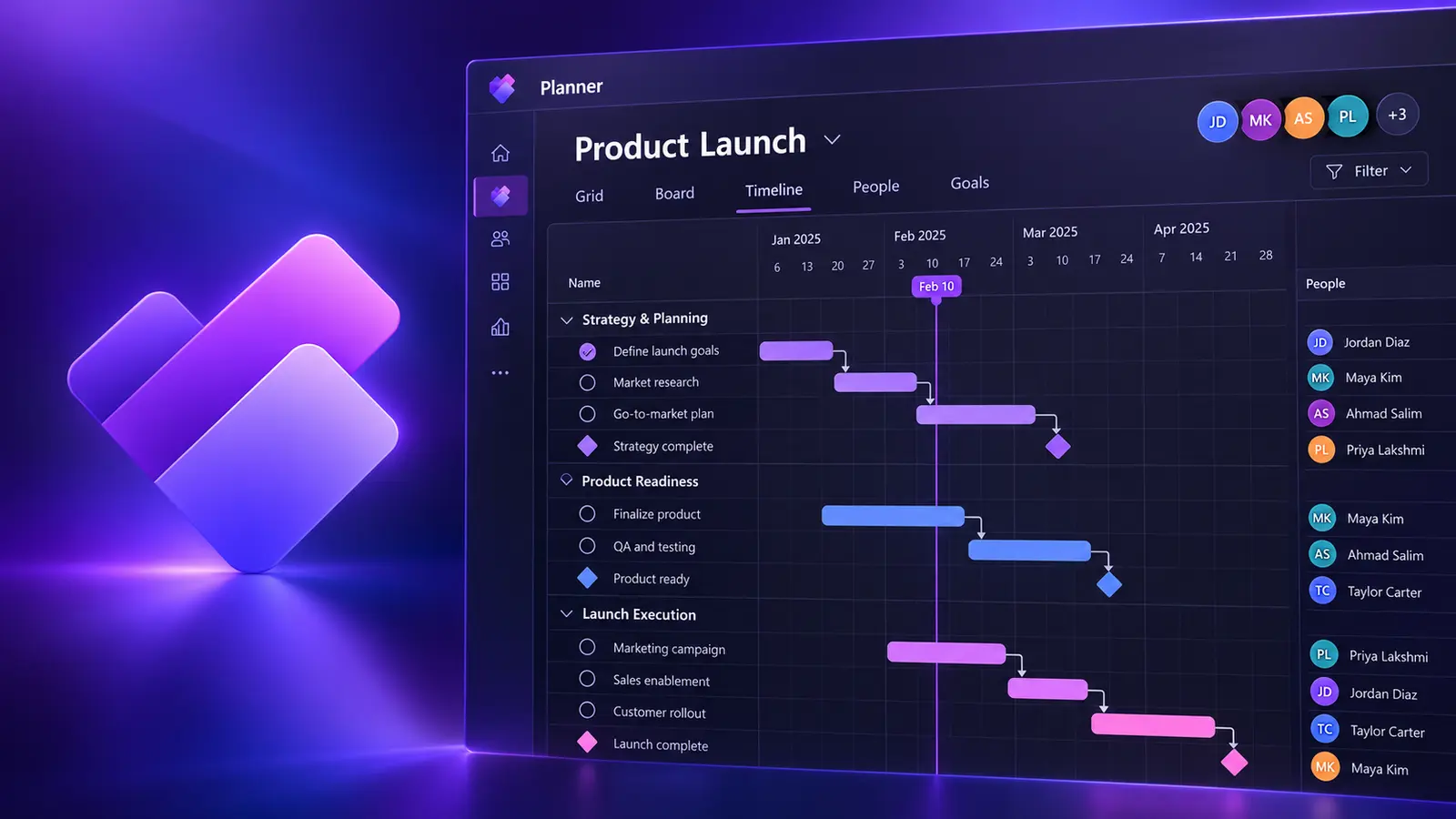
What you'll be able to do
Set up plans with dependencies.
Assign people and balance work.
Work across grid, board, timeline and charts.
Bring projects together in one view.
Course content
This course combines live instruction, demonstrations and practical exercises.
Upcoming Planner Training
New training dates are added regularly.
Continue your Planner learning
Microsoft Project helps organizations plan, schedule, and manage projects efficiently. Learn how to build schedules, manage resources, track progress, and report on project performance.
View course
Live instruction
Live, guided practice with time for questions and feedback. Ask about a private session tailored to your team.